
Installing the Dial-Up Script |
|
You can install the Scripting program from the
|
|
| 1. | Using the Windows95 CD – Run SCRIPTER.EXE |
| 2. | Using the Plus! Pack– From the Start button, Open up Programs / Accessories / Dial-Up Scripting Tool |
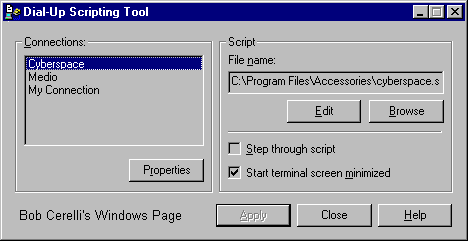
| 3. | Select the provider (if you have more than one) |
| 4. | Type in the name of the script (end with .scp) |
| 5. | Click on the Edit Button. This will bring up Notepad |
 |
|
| 6. | Type in your script. A sample one follows: |
   proc main

      waitfor "login:"
      transmit "your_login_name^M"

      waitfor "password:"
      transmit "your_password^M"

      waitfor "TERM = (vt100)"
      transmit "^M"

      waitfor "your_logon_prompt"
      transmit "ppp^M" ;My provider requires "ppp"

   endproc
|
|
| 7. | You can initially have Step through script turned on for debugging |
| 8. | When it is correct, check Start terminal screen minimized |
| 9. | Remember to turn off Bring up terminal window after dialing |
| 10. | Also make sure to turn off Logon to network in your Dial-Up icon / Properties / Server Type |
| 11. | For a complete listing of all the scripting options, read the SCRIPT.DOC file. |
This site is copyrighted. No portion may be reproduced without my written permission.


