|
Contents
|
Registry Overview
|
-
Windows95 uses a Registry rather than INI files to store hardware, system and 32-bit application configuration information.
-
This provides a single source for your computer’s hardware and software settings.
-
Often it is necessary to edit the Registry to make a change to your system.
A typical example is if you delete a 32-bit application’s files but it still shows up as an installed under Control Panel / Add/Remove Programs
-
The following is a description of how to use the Registry.
More information can be found in Chapter 33 of the Windows95 Resource Kit.
|
-
The Registry consists of two files, SYSTEM.DAT and USER.DAT.
Both are read-only, hidden, system files located in the directory where Windows95 is installed.
-
SYSTEM.DAT contains the hardware and computer specific information.
-
USER.DAT contains user-specific information.
|
Examining the Registry
|
To look a the Registry run the program REGEDIT.
|
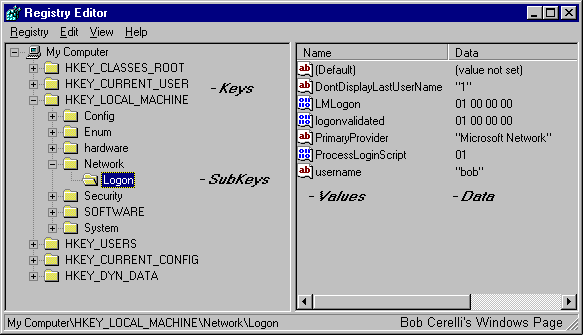 |
In the left panel are the Keys and SubKeys.
You can think of them just like Directories and Subdirectories.
In the right panel are the Values and each Value has its Value Data for the selected SubKey. |
For the above example, the Key is HKey_Local_Machine.
The SubKey is \ Network \ Logon.
There is a Value called username.
The Value Data is bob.
|
The Six Keys are:
|
Hkey_Classes_Root
|
This key displays information about OLE and associated mappings to support drag-and-drop operations. |
Hkey_Current_User
|
This points to a branch of Hkey_Users for the currently logged on user. |
Hkey_Local_Machine
|
This contains computer specific information including installed hardware and software. This is the one I tend to spend the most time in. |
Hkey_Users
|
This contains information about users that have logged on to the computer. |
Hkey_Current_Config
|
This key points to a branch of Hkey_Local_Machine \ Config and has information such as display fonts and printers. |
Hkey_Dyn_Data
|
This key points to a branch of Hkey_Local_Machine that has information about Plug and Play devices. |
You can start clicking on the + sign next to HKey_Local_Machine and get used to moving around the registry.
|
Searching the Registry
|
You can do this by selecting Edit / Find or Pressing Ctrl-F.
|
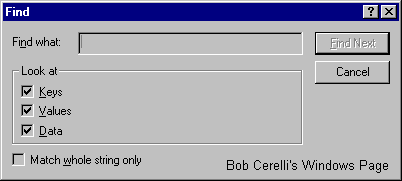 |
Type in the string or value you want to search for.
Note: You can shorten the search by only checking the appropriate Keys, Value, or Data box.
|
If you need to continue the search for the same name, select Edit / Find Next or press F3
|
Editing the Registry
|
Removing Entries
|
| 1. |
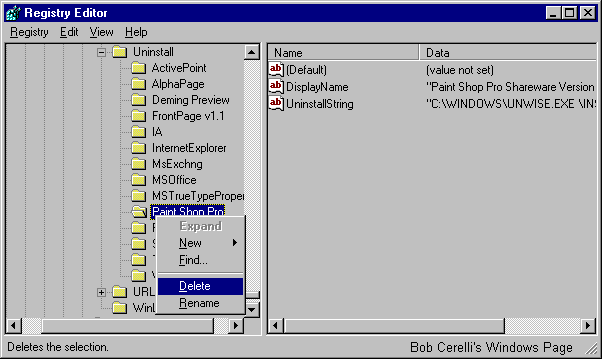
Start Regedit and search for Paint Shop Pro. |
| 2. |
Continue to search until you come to the Uninstall section. |
| 3. |
Right click on the name of the application |
| 4. |
Press the right-mouse button and select Delete. |
 |
Editing Existing Entries
|
| Lets say you wanted to edit your Modem’s initialization string but don’t know where it is located in your Registry. |
| 1. |
Start searching for the word modem until you get to a section that looks like the it might have that type of information. |
| 2. |
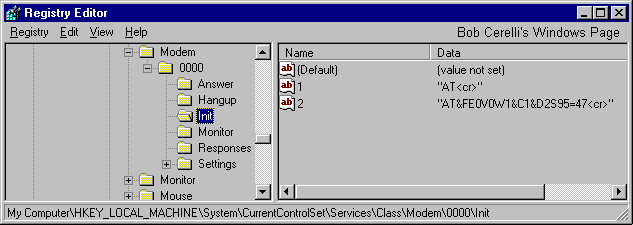
You will find it under HKLM \ System \ CurrentControlSet \ Services \ Class \ Modem \ 000n – where n is the number of your modem. |
| 3. |
Under there is a subkey Init and in this subkey is a Value which has your modem’s initialization string. |
 |
| 4. |
In this case, double click on the Value 2 in the right panel and type in the new string. |
| You can follow these same basic steps to search for and edit other areas of your Registry. |
Adding Entries
|
In the following example, you will add an entry to turn off the Windows animation when you minimize or maximize a window.
Note: Usually before you add an entry to the Registry, you already know the exact location and value. |
| 1. |
Move to HKey_Current_User \ Control Panel \ Desktop \ WindowMetrics |
| 2. |
To add an new value, either select Edit / New / String Value or right click on the right panel and select New / String Value. |
| 3. |
A new value will be created with the name New Value #1 and will be highlighted in blue. |
| 4. |
Type in the new name of MinAnimate |
| 5. |
Double click on MinAnimate and type 0 for it’s Value Data |
| You have now made a new Registry entry which will close or open windows immediately. |
| There are three types of Value Data you can select. |
| String |
For entering Text or simple numbers. Has a ab icon next to it. |
| Binary |
Has pairs of numbers separated by spaces. Has a 0101 icon next to it. |
| DWord |
In the form of 0x000000n (y) where n is the Hexadecimal value and y is the Decimal value |
Exporting and Importing the Registry
|
You can save the all or part of the Registry to a text file.
Exporting allows you to do several things. You can: quickly search for text strings, compare changes between two registry files and save changes you would like to later import.
Importing allows you to easily make changes to your registry. If you use these with the System Policy Editor , you can automatically make changes to networked computers. |
| When you are running Regedit, select Registry / Export (or Import) |
| When Exporting, you have the option of exporting the entire Registry (approximately 600K) or just the selected Branch. |
| You can also import and export the Registry from the command line. You will need to use the real-mode Regedit that is on a Windows95 Startup Disk |
/L:system
|
Specifies the location of the SYSTEM.DAT file |
/R:user
|
Specifies the location of the USER.DAT |
file.reg
|
Specifies the name of one or more files to import. |
/E file.reg
|
Specifies the file to export |
regkey
|
Specifies the starting Registry key from which to export. If no value is given, the entire Registry is exported. |
/C file.reg
|
Specifies the file to replace the entire contents of the Registry
Note: – Use with caution |
/S file.reg
|
Specifies the file to replace and automatically make the changes. Does not bring up confirmation dialog box. This makes it easy to run from batch files. |
Backing Up the Registry
|
| Since the Registry is so critical, it is important to keep backup copies just in case of problems. Fortunately several methods are available.
Until you are comfortable with editing your Registry, you should probably use one of the following means of keeping a backup available. |
Automatic
|
Windows95 keeps a backup of SYSTEM.DAT and USER.DAT with the extension .DA0. This is the previous copy of each file. If something should go wrong while you are working, you can try using these files. |
Manual Backup
|
You can manually copy the SYSTEM.DAT and USER.DAT files by moving to the Windows directory and typing XCOPY *.DAT A: /H
You can replace A: with whatever drive and directory you want to backup the files. Both should fit on a 1.44 Meg floppy disk. |
Emergency Recovery Utility
|
Microsoft includes their Emergency Recovery Utility(ERU) on the 95 CD-ROM. This utility makes a backup of the registry and other important system files. The ERU program is in the \OTHER\MISC\ERU directory on the Win95 CD. |
CFG Back
|
CFGBACK.EXE on the Win 95 CD will allow you to keep 9 copies of the Registry. It is in the /OTHER/MISC/CFGBACK directory. |
For more information at this site, see the Registry Tips section.
This site is copyrighted. No portion may be reproduced without my written permission.



